JavaScript Data Types - Primitives vs Non-Primitives Explained
January 7, 2026 • 12 min read
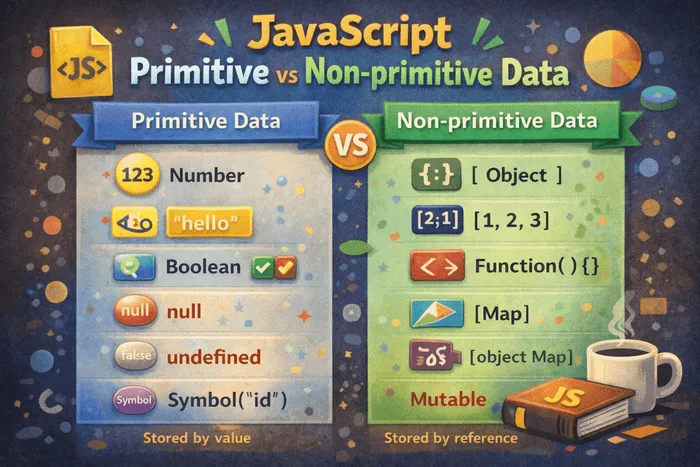
Imagine you’re organizing items in your room. Some items are simple and can’t be broken down further—like a pencil or a book. Others are containers that hold multiple items—like a backpack or a drawer. JavaScript data types work similarly: some are simple values (primitives), and others are containers that can hold complex data (non-primitives).
Understanding the difference between primitive and non-primitive data types is fundamental to mastering JavaScript. It affects how values are stored, compared, and passed around in your code.
What are data types?
Data types define what kind of value a variable can hold. JavaScript has two categories:
- Primitive data types: Simple, immutable values
- Non-primitive data types: Complex, mutable objects
Primitive data types
Primitives are the basic building blocks of JavaScript. They represent a single value and cannot be changed (immutable). JavaScript has 7 primitive types:
1. String
Text data enclosed in quotes (single, double, or backticks).
let name = "Alice";
let greeting = 'Hello';
let message = `Welcome, ${name}!`; // Template literal

console.log(typeof name); // "string"
2. Number
Numeric values, including integers and decimals. JavaScript has only one number type (unlike languages with int, float, double).
let age = 25;
let price = 19.99;
let negative = -10;
let billion = 1e9; // 1,000,000,000

console.log(typeof age); // "number"
Special numeric values:
let infinite = Infinity;
let notANumber = NaN; // "Not a Number" (result of invalid math)

console.log(10 / 0); // Infinity
console.log("hello" * 5); // NaN
3. Boolean
Logical values: true or false. Used for conditions and comparisons.
let isLoggedIn = true;
let hasPermission = false;

console.log(typeof isLoggedIn); // "boolean"
4. Undefined
A variable that has been declared but not assigned a value.
let x;
console.log(x); // undefined
console.log(typeof x); // "undefined"

function greet(name) {
  console.log(name); // undefined if not passed
}
greet(); // name is undefined
5. Null
Represents intentional absence of value. You explicitly set something to null.
let user = null; // No user currently

console.log(user); // null
console.log(typeof user); // "object" (historical bug in JavaScript!)Important: typeof null returns "object", which is a known bug in JavaScript that can’t be fixed due to backward compatibility.
6. Symbol (ES6)
Unique and immutable identifiers, mainly used for object properties.
let id1 = Symbol('id');
let id2 = Symbol('id');

console.log(id1 === id2); // false (each Symbol is unique)
console.log(typeof id1); // "symbol"
7. BigInt (ES2020)
For integers larger than Number.MAX_SAFE_INTEGER (2^53 - 1).
let bigNumber = 123456789012345678901234567890n; // Note the 'n'
let anotherBig = BigInt("123456789012345678901234567890");

console.log(typeof bigNumber); // "bigint"
Non-primitive data types (Objects)
Non-primitives are complex data structures that can hold collections of values and more complex entities. In JavaScript, everything that’s not a primitive is an object.
1. Object
A collection of key-value pairs (properties).
let person = {
  name: "Alice",
  age: 25,
  isStudent: true
};

console.log(typeof person); // "object"
console.log(person.name); // "Alice"
2. Array
An ordered list of values (which is actually a special type of object).
let colors = ["red", "green", "blue"];
let mixed = [1, "hello", true, null];

console.log(typeof colors); // "object"
console.log(Array.isArray(colors)); // true
console.log(colors[0]); // "red"
3. Function
Functions are callable objects.
function greet(name) {
  return `Hello, ${name}!`;
}

console.log(typeof greet); // "function"
console.log(greet instanceof Object); // true
4. Date
Built-in object for handling dates and times.
let now = new Date();
console.log(typeof now); // "object"
console.log(now instanceof Date); // true
5. RegExp (Regular Expression)
Objects for pattern matching in strings.
let pattern = /[a-z]+/;
console.log(typeof pattern); // "object"
console.log(pattern instanceof RegExp); // true
Key differences between primitives and non-primitives
1. Mutability
Primitives are immutable: You cannot change a primitive value itself, only reassign the variable.
let str = "hello";
str[0] = "H"; // No effect
console.log(str); // "hello" (unchanged)

str = "Hello"; // Reassignment creates a new value
console.log(str); // "Hello"
Non-primitives are mutable: You can change their properties/contents.
let person = { name: "Alice" };
person.name = "Bob"; // Modified
person.age = 25; // Added new property
console.log(person); // { name: "Bob", age: 25 }

let numbers = [1, 2, 3];
numbers.push(4); // Modified
console.log(numbers); // [1, 2, 3, 4]
2. Storage and copying
Primitives: Stored by value. Copying creates an independent copy.
let a = 10;
let b = a; // Copy the value

b = 20; // Change b

console.log(a); // 10 (unchanged)
console.log(b); // 20Non-primitives: Stored by reference. Copying creates a reference to the same object.
let person1 = { name: "Alice" };
let person2 = person1; // Copy the reference (both point to same object)

person2.name = "Bob"; // Change through person2

console.log(person1.name); // "Bob" (also changed!)
console.log(person2.name); // "Bob"
console.log(person1 === person2); // true (same reference)
This is one of the most important concepts to understand:
// Primitives: compare values
let x = 5;
let y = 5;
console.log(x === y); // true (same value)

// Objects: compare references
let obj1 = { value: 5 };
let obj2 = { value: 5 };
console.log(obj1 === obj2); // false (different objects in memory)

let obj3 = obj1;
console.log(obj1 === obj3); // true (same reference)
3. Comparison
Primitives: Compared by value.
console.log(5 === 5); // true
console.log("hello" === "hello"); // true
console.log(true === true); // trueNon-primitives: Compared by reference.
console.log([1, 2] === [1, 2]); // false (different arrays)
console.log({ a: 1 } === { a: 1 }); // false (different objects)

let arr = [1, 2];
let sameArr = arr;
console.log(arr === sameArr); // true (same reference)
How values are passed to functions
Primitives: Passed by value (copy).
function increment(num) {
  num = num + 1;
  console.log("Inside:", num); // 11
}

let count = 10;
increment(count);
console.log("Outside:", count); // 10 (unchanged)Non-primitives: Passed by reference.
function addAge(person) {
  person.age = 25;
  console.log("Inside:", person); // { name: "Alice", age: 25 }
}

let user = { name: "Alice" };
addAge(user);
console.log("Outside:", user); // { name: "Alice", age: 25 } (changed!)
However, reassigning the parameter doesn’t affect the original:
function reassign(arr) {
  arr = [99, 100]; // Reassigns local reference only
}

let numbers = [1, 2, 3];
reassign(numbers);
console.log(numbers); // [1, 2, 3] (unchanged)
But modifying the object does:
function modify(arr) {
  arr.push(99); // Modifies the original array
}

let numbers = [1, 2, 3];
modify(numbers);
console.log(numbers); // [1, 2, 3, 99] (changed!)
Copying objects and arrays properly
Since objects and arrays are passed by reference, you need special techniques to create true copies.
Shallow copy
Copies only the top level. Nested objects/arrays are still references.
// Arrays
let original = [1, 2, 3];
let copy1 = [...original]; // Spread operator
let copy2 = original.slice(); // slice method
let copy3 = Array.from(original); // Array.from

copy1.push(4);
console.log(original); // [1, 2, 3] (unchanged)

// Objects
let person = { name: "Alice", age: 25 };
let personCopy1 = { ...person }; // Spread operator
let personCopy2 = Object.assign({}, person); // Object.assign

personCopy1.name = "Bob";
console.log(person.name); // "Alice" (unchanged)
Problem with shallow copy and nested objects:
let user = {
  name: "Alice",
  address: { city: "NYC" }
};

let userCopy = { ...user };
userCopy.address.city = "LA"; // Modifies nested object

console.log(user.address.city); // "LA" (changed!)
// The nested 'address' object is still a reference
Deep copy
Copies everything, including nested structures.
// Using JSON (simple but has limitations)
let original = {
  name: "Alice",
  address: { city: "NYC" }
};

let deepCopy = JSON.parse(JSON.stringify(original));
deepCopy.address.city = "LA";

console.log(original.address.city); // "NYC" (unchanged)
Limitations of JSON method:
- Doesn’t work with functions,
undefined,Symbol,Date,RegExp - Loses methods and prototype chain
let obj = {
  func: () => console.log("hello"),
  date: new Date(),
  undef: undefined
};

let copy = JSON.parse(JSON.stringify(obj));
console.log(copy);
// { date: "2026-01-07T..." } (func and undef are lost!)
For complex deep copying, use libraries like Lodash (_.cloneDeep()) or the newer structuredClone():
let original = {
  name: "Alice",
  greet: () => console.log("Hi"),
  date: new Date()
};

let deepCopy = structuredClone(original);
// Works with most data types (but still not functions)
Type checking
// typeof operator (for primitives)
console.log(typeof "hello"); // "string"
console.log(typeof 42); // "number"
console.log(typeof true); // "boolean"
console.log(typeof undefined); // "undefined"
console.log(typeof Symbol()); // "symbol"
console.log(typeof 123n); // "bigint"

// typeof limitations with objects
console.log(typeof null); // "object" (bug!)
console.log(typeof []); // "object"
console.log(typeof {}); // "object"
console.log(typeof function(){}); // "function"

// Better methods for objects
console.log(Array.isArray([])); // true
console.log(null === null); // Check for null explicitly

// instanceof (checks prototype chain)
console.log([] instanceof Array); // true
console.log(new Date() instanceof Date); // true
console.log({} instanceof Object); // true
Common pitfalls
1. Accidentally modifying objects
// Bug: Both variables point to same object
let settings = { theme: "dark" };
let userSettings = settings;
userSettings.theme = "light";
console.log(settings.theme); // "light" (oops!)

// Fix: Create a copy
let userSettings = { ...settings };
2. Comparing objects incorrectly
// Bug: Objects are compared by reference
let user1 = { name: "Alice" };
let user2 = { name: "Alice" };
console.log(user1 === user2); // false (different objects)

// Fix: Compare properties
console.log(user1.name === user2.name); // true
// Or use JSON.stringify for simple objects
console.log(JSON.stringify(user1) === JSON.stringify(user2)); // true
3. Unexpected behavior with null and undefined
console.log(typeof null); // "object" (not "null"!)
console.log(null == undefined); // true (loose equality)
console.log(null === undefined); // false (strict equality)

// Always use strict equality
if (value === null) { /* handle null */ }
if (value === undefined) { /* handle undefined */ }
4. Mutating array/object parameters
// Bug: Function modifies original array
function removeFirst(arr) {
  arr.shift();
  return arr;
}

let numbers = [1, 2, 3];
removeFirst(numbers);
console.log(numbers); // [2, 3] (modified!)

// Fix: Work with a copy
function removeFirst(arr) {
  let copy = [...arr];
  copy.shift();
  return copy;
}
Practical examples
Example 1: Shopping cart
let cart = [
  { id: 1, name: "Laptop", price: 1000 },
  { id: 2, name: "Mouse", price: 25 }
];

// Wrong: Modifying original
function addDiscount(items) {
  items.forEach(item => item.price *= 0.9); // 10% off
  return items;
}

// Right: Return new array with new objects
function addDiscount(items) {
  return items.map(item => ({
    ...item,
    price: item.price * 0.9
  }));
}

let discountedCart = addDiscount(cart);
console.log(cart[0].price); // 1000 (unchanged)
console.log(discountedCart[0].price); // 900
Example 2: User preferences
const DEFAULT_SETTINGS = {
  theme: "light",
  notifications: true,
  language: "en"
};

// Create user settings without modifying defaults
function createUserSettings(customSettings) {
  return {
    ...DEFAULT_SETTINGS,
    ...customSettings
  };
}

let userSettings = createUserSettings({ theme: "dark" });
console.log(DEFAULT_SETTINGS.theme); // "light" (unchanged)
console.log(userSettings.theme); // "dark"
Example 3: Checking for empty values
function isEmptyValue(value) {
  // Primitives
  if (value === null || value === undefined) return true;
  if (typeof value === "string" && value.trim() === "") return true;
  if (typeof value === "number" && isNaN(value)) return true;

  // Objects
  if (Array.isArray(value) && value.length === 0) return true;
  if (typeof value === "object" && Object.keys(value).length === 0) return true;

  return false;
}

console.log(isEmptyValue(null)); // true
console.log(isEmptyValue("")); // true
console.log(isEmptyValue([])); // true
console.log(isEmptyValue({})); // true
console.log(isEmptyValue("hello")); // false
Quick reference table
| Type | Category | Mutable | Passed by | Example |
|---|---|---|---|---|
| String | Primitive | No | Value | "hello" |
| Number | Primitive | No | Value | 42 |
| Boolean | Primitive | No | Value | true |
| Undefined | Primitive | No | Value | undefined |
| Null | Primitive | No | Value | null |
| Symbol | Primitive | No | Value | Symbol() |
| BigInt | Primitive | No | Value | 123n |
| Object | Non-primitive | Yes | Reference | { a: 1 } |
| Array | Non-primitive | Yes | Reference | [1, 2, 3] |
| Function | Non-primitive | Yes | Reference | function(){} |
Takeaways
- Primitives are simple, immutable values stored directly
- Non-primitives are complex objects stored by reference
- Primitives are compared by value; objects are compared by reference
- Modifying an object affects all variables that reference it
- Use spread operator
{...obj}or[...arr]for shallow copies - Use
structuredClone()or JSON for deep copies (with limitations) - Always be aware whether you’re working with a value or a reference
When to use what
- Primitives: For simple data that doesn’t need to change (numbers, text, flags)
- Objects: For complex data with multiple properties (user data, settings)
- Arrays: For ordered collections (lists, queues, stacks)
- Shallow copy: When you need to copy an object without nested structures
- Deep copy: When you have nested objects/arrays and need complete independence
Don’ts (best practices)
- Don’t mutate function parameters unless explicitly intended
- Don’t compare objects with
===expecting value comparison - Don’t forget that
typeof null === "object"(use=== nullinstead) - Don’t use
==for comparisons (use===to avoid type coercion) - Don’t assume shallow copy works for nested structures
- Don’t use JSON for deep copying objects with functions or special types
Frequently Asked Questions
What's the difference between null and undefined?
undefined means a variable hasn't been assigned a value yet. null is an intentional assignment representing "no value." Use null when you explicitly want to indicate absence of a value.
Why does typeof null return "object"?
This is a bug from JavaScript's early days that can't be fixed due to backward compatibility. Always check for null explicitly using value === null.
How do I check if a variable is an array?
Use Array.isArray(variable). Don't use typeof because it returns "object" for arrays.
What happens when I compare two objects?
JavaScript compares them by reference, not by their content. Two objects with identical properties are not equal unless they reference the same object in memory.
Should I use const for objects if they're mutable?
Yes! const prevents reassignment of the variable, but you can still modify the object's properties. This is actually good practice - it prevents accidental reassignment while allowing property changes.
How do I create a true copy of an object with nested properties?
Use structuredClone() (modern browsers) or JSON.parse(JSON.stringify(obj)) for simple objects. For complex objects with functions, use a library like Lodash's _.cloneDeep().
What's the difference between == and ===?
== does type coercion (converts types before comparing), while === checks both value and type. Always use === to avoid unexpected behavior.
Stay in the loop
Get the latest updates on my blog, projects, and tech insights delivered straight to your inbox. No spam, unsubscribe anytime.
By subscribing, you agree to receive occasional updates. Unsubscribe anytime.