Understanding JavaScript Event Propagation
January 7, 2026 • 8 min read
When you click a button nested inside a div, which element “hears” the click first? Understanding event propagation is crucial for building interactive web applications and avoiding mysterious bugs.
Think of event propagation like dropping a stone in a pond. The ripple doesn’t just affect the exact point where the stone landed—it travels outward through the water. Similarly, when you click a nested element, the event travels through the DOM tree, giving multiple elements a chance to respond.
What is event propagation?
Event propagation is the mechanism that determines the order in which event handlers are executed when an event occurs on nested elements. It describes how events travel through the DOM tree.
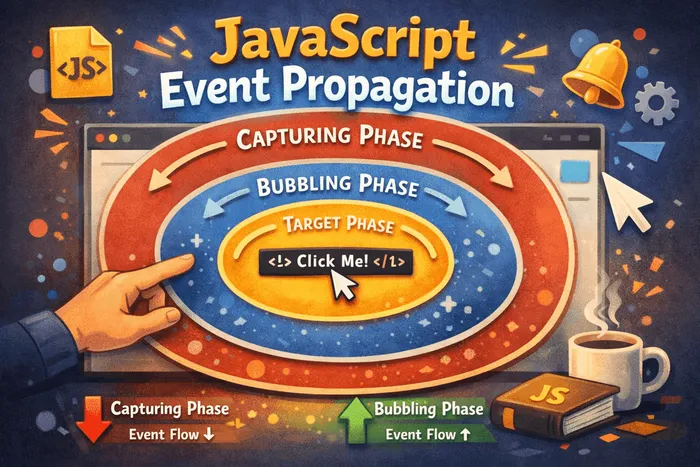
When an event is triggered on an element (like a click on a button), the event doesn’t just fire on that element. It travels through the entire DOM tree in three distinct phases:
- Capturing phase (trickling down)
- Target phase (on the element itself)
- Bubbling phase (bubbling up)
The three phases of event propagation
1. Capturing Phase (Capture)
The event starts from the window and travels down through the DOM tree toward the target element. Along the way, it passes through all ancestor elements.
<div id="grandparent">
  <div id="parent">
    <button id="child">Click me</button>
  </div>
</div>
When you click the button, the event travels: window → document → html → body → grandparent → parent → child
2. Target Phase
The event reaches the actual element that was clicked (the target element). Event listeners registered on the target element fire here.
3. Bubbling Phase (Bubble)
After reaching the target, the event bubbles back up through the ancestors to the window. This is the default phase where most event listeners operate.
The path is reversed: child → parent → grandparent → body → html → document → window
Event bubbling explained
Event bubbling is the most commonly used phase. By default, when you attach an event listener using addEventListener, it listens during the bubbling phase.
const grandparent = document.getElementById('grandparent');
const parent = document.getElementById('parent');
const child = document.getElementById('child');

child.addEventListener('click', () => {
  console.log('Child clicked!');
});

parent.addEventListener('click', () => {
  console.log('Parent clicked!');
});

grandparent.addEventListener('click', () => {
  console.log('Grandparent clicked!');
});

// Click the button
// Output:
// Child clicked!
// Parent clicked!
// Grandparent clicked!
The event fires on the child first, then bubbles up to parent, then grandparent. Each ancestor gets a chance to respond.
Event capturing explained
Capturing is the opposite of bubbling. To listen during the capturing phase, pass true as the third argument to addEventListener (or use { capture: true }).
grandparent.addEventListener('click', () => {
  console.log('Grandparent (capturing)');
}, true); // Capture phase

parent.addEventListener('click', () => {
  console.log('Parent (capturing)');
}, true);

child.addEventListener('click', () => {
  console.log('Child clicked!');
});

// Click the button
// Output:
// Grandparent (capturing)
// Parent (capturing)
// Child clicked!
Capturing listeners fire first as the event trickles down, then the target’s listener fires.
Combining capture and bubble
You can mix both phases to control execution order precisely:
parent.addEventListener('click', () => {
  console.log('Parent (capture phase)');
}, true);

parent.addEventListener('click', () => {
  console.log('Parent (bubble phase)');
}, false); // or just omit the third parameter

child.addEventListener('click', () => {
  console.log('Child clicked!');
});

// Click the button
// Output:
// Parent (capture phase)
// Child clicked!
// Parent (bubble phase)
Stopping propagation
You can control event flow using these methods:
event.stopPropagation()
Prevents the event from traveling further in either direction. The event stops at the current element.
child.addEventListener('click', (event) => {
  console.log('Child clicked!');
  event.stopPropagation(); // Stop here!
});

parent.addEventListener('click', () => {
  console.log('Parent clicked!'); // Never runs
});

// Click the button
// Output:
// Child clicked!
event.stopImmediatePropagation()
Not only stops propagation to other elements, but also prevents other listeners on the same element from running.
child.addEventListener('click', (event) => {
  console.log('First listener');
  event.stopImmediatePropagation();
});

child.addEventListener('click', () => {
  console.log('Second listener'); // Never runs
});

// Click the button
// Output:
// First listener
event.preventDefault()
Prevents the default browser action (like following a link or submitting a form), but does NOT stop propagation.
document.querySelector('a').addEventListener('click', (event) => {
  event.preventDefault(); // Don't navigate
  console.log('Link clicked but not followed');
});
Event delegation
Event delegation is a powerful pattern that leverages event bubbling. Instead of attaching listeners to many child elements, attach one listener to a common ancestor.
Without delegation (inefficient)
const buttons = document.querySelectorAll('.item');

buttons.forEach(button => {
  button.addEventListener('click', handleClick);
});

// Problem: 100 buttons = 100 event listeners
With delegation (efficient)
const list = document.getElementById('list');

list.addEventListener('click', (event) => {
  if (event.target.matches('.item')) {
    handleClick(event.target);
  }
});

// One listener handles all current and future .item elements!
Benefits:
- Fewer event listeners (better memory usage)
- Works with dynamically added elements
- Centralized event handling logic
The event object
Every event handler receives an event object with useful properties:
element.addEventListener('click', (event) => {
  console.log(event.target);       // Element that triggered the event
  console.log(event.currentTarget); // Element with the listener attached
  console.log(event.eventPhase);    // 1=capture, 2=target, 3=bubble
  console.log(event.bubbles);       // Can this event bubble?
  console.log(event.type);          // Event type (e.g., 'click')
});
event.target vs event.currentTarget
event.target: The actual element that was clicked (where the event originated)event.currentTarget: The element that has the listener attached (the element you’re listening on)
document.getElementById('parent').addEventListener('click', (event) => {
  console.log('Target:', event.target.id);       // child
  console.log('CurrentTarget:', event.currentTarget.id); // parent
});

// Click the child button
Events that don’t bubble
Not all events bubble. Some common non-bubbling events:
focus/blur(usefocusin/focusoutinstead—they bubble)load/unloadmouseenter/mouseleave(usemouseover/mouseoutinstead)scroll(in most cases)
// Won't work with delegation
parent.addEventListener('focus', () => {
  console.log('Child focused'); // Won't fire when child focuses
});

// Use focusin instead
parent.addEventListener('focusin', () => {
  console.log('Child focused'); // Works!
});
Practical use cases
1. Modal close on backdrop click
modal.addEventListener('click', (event) => {
  if (event.target === modal) {
    closeModal(); // Only close if backdrop clicked, not content
  }
});

modalContent.addEventListener('click', (event) => {
  event.stopPropagation(); // Prevent closing when clicking content
});
2. Dynamic list with actions
<ul id="todo-list">
  <li data-id="1">Task 1 <button class="delete">Delete</button></li>
  <li data-id="2">Task 2 <button class="delete">Delete</button></li>
</ul>document.getElementById('todo-list').addEventListener('click', (event) => {
if (event.target.matches('.delete')) {
const li = event.target.closest('li');
const id = li.dataset.id;
deleteTask(id);
li.remove();
}
});3. Keyboard navigation
document.addEventListener('keydown', (event) => {
  if (event.key === 'Escape') {
    closeAllModals();
  }
});
Common pitfalls
1. Forgetting that events bubble
// Bug: Clicking child triggers parent handler twice
parent.addEventListener('click', doSomething);
child.addEventListener('click', doSomething);

// Fix: Check event.target or stop propagation
child.addEventListener('click', (event) => {
  event.stopPropagation();
  doSomething();
});
2. Using stopPropagation() too liberally
Stopping propagation can break event delegation and third-party libraries that rely on bubbling. Use it sparingly and only when necessary.
// Problematic: Breaks analytics or other global listeners
button.addEventListener('click', (event) => {
  event.stopPropagation(); // Oops, analytics won't see this click
  handleButtonClick();
});
3. Memory leaks with delegation
// Bad: Creating closures for each item
list.addEventListener('click', (event) => {
  const item = event.target;
  // Be careful with large data structures in closures
});
4. Not checking event.target in delegation
// Bug: Clicking anywhere in parent triggers action
parent.addEventListener('click', () => {
  deleteItem(); // Runs even if you click padding!
});

// Fix: Check the target
parent.addEventListener('click', (event) => {
  if (event.target.matches('.delete-btn')) {
    deleteItem();
  }
});
Don’ts (best practices)
- Don’t overuse
stopPropagation()—it can break third-party code - Don’t attach listeners in loops—use delegation instead
- Don’t forget to remove listeners when elements are removed (memory leaks)
- Don’t assume all events bubble—check the event specification
- Don’t use inline event handlers (
onclick="...")—they’re harder to manage
Performance considerations
Event delegation is generally more performant, but consider:
// If you have very specific listeners, direct attachment may be clearer
specificButton.addEventListener('click', handleSpecificAction);

// Use delegation for:
// - Lists with many items
// - Dynamically added content
// - Similar actions across multiple elements
When to use what
- Use bubbling (default): For most event handling needs
- Use capturing: When you need to intercept events before they reach targets (rare)
- Use delegation: For lists, grids, or dynamic content
- Use
stopPropagation(): Only when you truly need to prevent parent handlers - Use
preventDefault(): To prevent default browser behavior (links, forms)
Quick demo
Try to predict the output:
const outer = document.getElementById('outer');
const inner = document.getElementById('inner');

outer.addEventListener('click', () => console.log('Outer (bubble)'), false);
outer.addEventListener('click', () => console.log('Outer (capture)'), true);
inner.addEventListener('click', () => console.log('Inner'));

// Click inner element
// Output:
// Outer (capture)
// Inner
// Outer (bubble)
Why? Capture phase runs first (outer capture), then target phase (inner), then bubble phase (outer bubble).
Takeaways
- Events travel through three phases: capture → target → bubble
- Most event handling happens in the bubble phase (default)
- Use event delegation for better performance and dynamic content
event.targettells you what was clicked;event.currentTargettells you where the listener is- Not all events bubble—check the documentation
- Use
stopPropagation()sparingly to avoid breaking other code preventDefault()stops default behavior but NOT propagation
Debugging event propagation
element.addEventListener('click', (event) => {
  console.log('Phase:', event.eventPhase); // 1=capture, 2=target, 3=bubble
  console.log('Target:', event.target);
  console.log('CurrentTarget:', event.currentTarget);
  console.log('Bubbles:', event.bubbles);
});
Use browser DevTools to see all listeners on an element: Right-click → Inspect → Event Listeners tab.
Frequently Asked Questions
Should I use capturing or bubbling?
Use bubbling (the default) for 99% of cases. Capturing is rarely needed and is typically used for intercepting events before they reach their targets.
Why use event delegation instead of attaching listeners directly?
Delegation uses less memory, works with dynamically added elements, and centralizes your event handling logic. It's especially powerful for lists or grids with many items.
What's the difference between stopPropagation() and preventDefault()?
stopPropagation() stops the event from traveling to other elements. preventDefault() prevents the browser's default action (like following a link) but the event still propagates normally.
Can I stop an event during the capturing phase?
Yes, calling stopPropagation() during capture prevents the event from reaching the target and bubbling back up.
What happens if I call both stopPropagation() and preventDefault()?
Both take effect independently - the event stops propagating AND the default action is prevented. There's also a shorthand "return false" (but only in some contexts - not recommended).
How do I remove an event listener?
Use removeEventListener() with the exact same function reference and options. Anonymous functions can't be removed, so use named functions or store references.
Stay in the loop
Get the latest updates on my blog, projects, and tech insights delivered straight to your inbox. No spam, unsubscribe anytime.
By subscribing, you agree to receive occasional updates. Unsubscribe anytime.