Understanding the Node.js Event Loop
December 15, 2025 • 6 min read
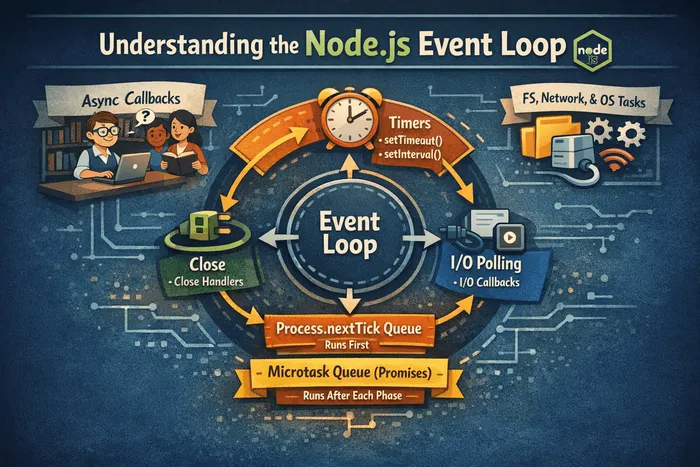
The Node.js event loop is the heartbeat of the runtime. It lets single-threaded JavaScript feel “multitasked” by rapidly taking turns running tiny pieces of work.
Think of a helpful librarian (the event loop) serving many readers (your callbacks). The librarian doesn’t read every book themselves. Instead, they:
- Note requests (I/O like files, network, timers)
- Hand them to specialists (libuv and the OS)
- Call you back when results are ready
As long as you don’t make the librarian read an entire book aloud (long synchronous code), everyone gets served quickly.
What the event loop does
- Orchestrates phases where different kinds of callbacks run
- Keeps the process alive while there’s work to do
- Prioritizes microtasks (Promises, queueMicrotask) ahead of macrotasks
“Microtasks” are very small, high-priority jobs (mostly Promise callbacks). They run right after the current bit of JavaScript finishes, before the loop moves to the next big step. “Macrotasks” are the bigger scheduled items like timers or setImmediate.
Event Loop: What runs there?
- All application code inside callback functions (i.e., non–top-level code) executes within the event loop.
Event-driven architecture
- Node.js uses an event-driven model. As your application receives requests, it emits events.
- The event loop picks up these events and invokes the associated callback functions.
- In short: the event loop orchestrates when and how callbacks are processed.
Event loop phases
- Expired timer callbacks
- Examples include callbacks from
setTimeout()andsetInterval()whose timers have expired. - If a timer expires while another phase is running, its callback will be executed only when the loop returns to the Timers phase.
- Callbacks in each phase’s queue are processed one by one until the queue is empty; only then does the loop move to the next phase.
- I/O polling and I/O callbacks
- Polling means checking for new I/O events that are ready and enqueueing their callbacks.
- I/O mainly covers networking and file system operations. In typical Node apps, most of your code executes here because the bulk of the work involves I/O.
setImmediatecallbacks
setImmediateis a special timer for running callbacks right after the I/O poll and execution phase. This can be useful in advanced scenarios.
- Close callbacks
- Handles “close” events, e.g., when a server or WebSocket shuts down. Often less critical for everyday use.
Two special queues: process.nextTick and microtasks
- In addition to the four main phases, Node.js has the
nextTickqueue and the microtasks queue (primarily for resolved Promises). - If there are callbacks in either of these queues, they run immediately after the current phase finishes—without waiting for the entire loop to complete.
- Example: If a Promise resolves while a timer callback is running, the Promise’s callback will run as soon as the current callback finishes, before the loop advances to the next phase.
- The same applies to
process.nextTick(). UsenextTickwhen you truly need a callback to run right after the current phase. It’s similar in spirit tosetImmediate, butsetImmediateruns after the I/O callbacks (Check phase), whilenextTickruns sooner. Both are primarily for advanced use cases.
The phases at a glance
- Timers (expired timer callbacks):
setTimeout,setInterval - I/O polling and callbacks: networking and filesystem I/O; executes ready I/O callbacks
- Check:
setImmediatecallbacks (run right after the I/O poll/execution phase) - Close callbacks: e.g., server or WebSocket shutdown handlers
Special queues processed after each phase:
process.nextTickqueue (runs immediately after the current phase, before microtasks)- Microtasks queue (mostly resolved Promises)
Visual timeline (simplified)
Timers → run due setTimeout/setInterval
↳ run process.nextTick callbacks
↳ run all microtasks (Promise .then)
Poll → run I/O callbacks (network, filesystem)
↳ run process.nextTick callbacks
↳ run all microtasks
Check → run setImmediate
↳ run process.nextTick callbacks
↳ run all microtasks
Close → run close callbacks (e.g., socket.on('close'))
↳ run process.nextTick callbacks
↳ run all microtasks
Repeat while there are pending timers or I/O tasks.
What is a “tick”?
- A tick is one full cycle of the event loop.
When does the loop continue vs exit?
- Node decides whether to continue to the next tick or exit by checking for pending timers or I/O tasks.
- If none are pending, the application exits. If there are pending timers or I/O, the loop continues.
- For example, when a Node.js HTTP server is listening, that constitutes an I/O task—so the event loop keeps running and continues accepting new requests. Similarly, reading/writing files keeps the loop alive until those operations complete.
Don’ts (performance and reliability)
- Don’t use synchronous versions of functions in
fs,crypto, andzlibinside callbacks. - Don’t perform complex, heavy computations on the main thread (e.g., deep nested loops).
- Be cautious with JSON operations on very large objects.
- Avoid overly complex regular expressions (e.g., nested quantifiers) that can cause catastrophic backtracking.
Common pitfalls
- Long synchronous work blocks the loop; use workers or chunk work
- Mixing
setTimeout(0)and Promises often surprises ordering - Heavy CPU-bound tasks should not run on the main thread
Tip: If you must do heavy computation, break it into small slices using setImmediate or setTimeout(0) between slices, or use worker_threads.
Quick demo
Try to predict the order:
setTimeout(() => console.log('timeout'), 0);
setImmediate(() => console.log('immediate'));
Promise.resolve().then(() => console.log('promise'));

// Likely: promise, then timeout/immediate (order can vary across env)
Why does this happen?
- Promises schedule microtasks; they run before moving to the next phase.
setTimeout(0)runs in the Timers phase when its time is due.setImmediateruns in the Check phase. Depending on when you schedule them and the environment,timeoutvsimmediateordering can swap.
Try another example to see microtasks vs macrotasks:
console.log('A');
setTimeout(() => console.log('B (timeout)'), 0);
Promise.resolve().then(() => console.log('C (promise)'));
console.log('D');
// Output: A, D, C (promise), B (timeout)
Explanation: The synchronous logs run first (A, D). Then the microtask from the Promise runs (C). Finally the timer callback runs (B).
Takeaways
- Prefer async I/O and avoid long synchronous blocks
- Use
setImmediatefor post-poll work, Promises for microtasks - For CPU-bound tasks, use
worker_threadsor offload to services
When to use what
- Use Promises/
asyncfunctions for chaining small async steps (microtasks are fast). - Use
setImmediateto run something right after I/O callbacks (post-poll). - Use Timers for scheduling work a bit later or repeatedly.
- Use
process.nextTicksparingly; it runs even before other microtasks and can starve the loop if abused.
Detecting a blocked loop
If your server feels “stuck,” check for long synchronous loops or JSON/string operations on large objects. Profilers (node --prof, Chrome DevTools) can reveal hotspots.
Further reading: Node.js docs on event loop, libuv guide.
Frequently Asked Questions
Is Node.js truly single-threaded?
Your JavaScript runs on a single main thread, but Node uses other threads under the hood (libuv thread pool, OS) for I/O. You can also use worker_threads for CPU-bound tasks.
Why do Promises run "sooner" than setTimeout(0)?
Promise callbacks are microtasks and run at the end of the current turn before the loop continues to the next phase where timers live.
Can I guarantee setImmediate always before/after setTimeout(0)?
No. The relative order can vary based on context (polling state, platform). Prefer Promises for deterministic microtask ordering.
Stay in the loop
Get the latest updates on my blog, projects, and tech insights delivered straight to your inbox. No spam, unsubscribe anytime.
By subscribing, you agree to receive occasional updates. Unsubscribe anytime.